

If there’s anything that can make me madder than banner ads and commercial sidebars, it’s pop-ups and unsolicited videos when I am simply trying to read an article on the web.
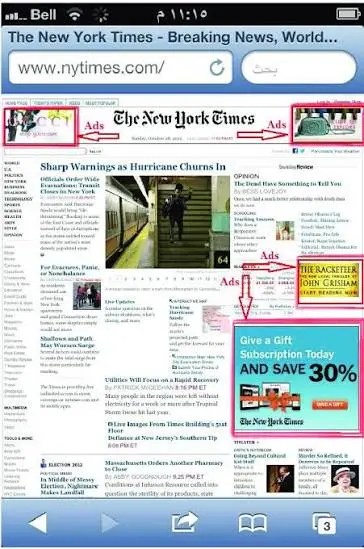
There’s a free browser extension called Just Read that may help.
Just Read takes an article on a webpage and reformats it into a much cleaner, simpler reading view. It removes much of the surrounding clutter and lets you concentrate on the actual content.
Bliss! I can read without colors flashing, videos hollering, and pop-ups popping. And it doesn’t just remove distractions.
The good stuff:
- Removes ads, pop-ups, navigation menus and other distractions.
- Lets you customize the appearance, including text and background colors if you wish.
- Offers a dark reading mode.
- Allows you to select the particular text you want to keep.
- Can print a cleaner version of an article.
- Has an AI summarization feature.
A few caveats:
- Just Read is available for Chrome, Edge, Firefox and several other browsers. Check compatibility with your particular browser before installing.
- It works best with article-type webpages, not every kind of website.
- It won’t always identify the article correctly, so occasionally you may have to do a little editing yourself.
- Some additional features, including saving, sharing and annotating articles, require the paid Premium version.
Just Read in the Chrome Web Store
I downloaded it. Now I read what I want to in peace. Not 100% of web sites allow this, but most do. Just Read makes my screen time a whole lot more enjoyable. Try it!
Discover more from
Subscribe to get the latest posts sent to your email.


